
The Best AI Tools for Founders in 2026, by Job to Be Done
A no-hype rundown of AI tools worth using when you're starting a company, organized by the actual job you're trying to get done at each stage.
By James Edgewood · Contributor at TheQuandary
There's a new "best AI tools" list every week, and most are just a pile of logos. This one is organized differently, by the job you're actually trying to get done as a founder. The tool matters less than the work you point it at. You don't need every tool; you need the right one for the stage you're in, and a clear idea of what you're using it for.
Finding and validating an idea
This is the stage most tool lists skip, and it's the one that saves the most money. Before you build, you want to know if anyone wants the thing.
General assistants can role-play a customer if you prompt them well, but they work from imagination and tend to be agreeable. A purpose-built tool is more useful here. TheQuandary simulates how your target customers would react, ranks the objections and ties them to real public quotes, lets you interview the personas afterward, and gives you a confidence score, plus a Reverse Mode that generates and ranks candidate ideas from your skills. If you're at the idea or validation stage, start here: it's covered in depth in how to use AI to validate a business idea.
Research and writing
General-purpose assistants like ChatGPT and Claude are the workhorses for summarizing research, drafting copy, structuring documents, and thinking out loud. They're excellent for first drafts and synthesis. Just keep the rule from market research with AI in mind: trust them for patterns and summaries, verify any hard numbers against a real source.
Building the first version
You no longer need a developer to get a working prototype. AI coding assistants and no-code or low-code builders can stand up a landing page, a simple app, or an automation from a plain-English description. Keep the first build small. The point is something real enough to test, not a finished product.
Design and brand
AI image and design tools can produce a logo, a color system, and on-brand visuals fast enough that "I'm not a designer" is no longer an excuse to launch ugly. Good enough early; you can invest in real design once you have traction.
Marketing and content
For getting your first customers, AI helps with landing-page copy, content drafts, ad variations, and turning customer objections into the exact language that converts. The leverage is in volume and speed. The judgment about what to say, and the real conversations that produce it, are still yours.
How to choose without drowning
A few principles that save time and money:
- One or two tools per stage. Overlapping subscriptions create work, not output.
- Match the tool to the job. A general chatbot is fine for drafting; use a specialist for validation, where being agreeable is a liability.
- Add tools at bottlenecks, not because something is trending.
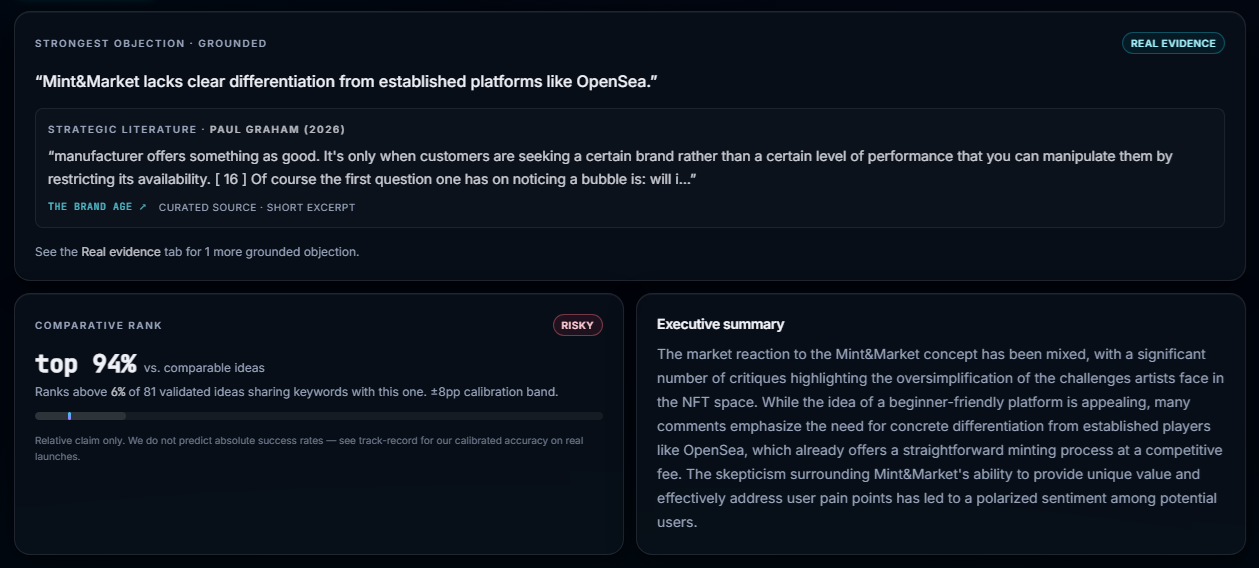 Ranked objections and a confidence score you can defend.
The one to start with. Before you spend on building or marketing tools, make sure the idea is worth it. Run a validation and get objections, archetypes, and a confidence score. → Find me an idea
For how all of this fits together across the journey, see how to start a business with AI.
Common questions
What AI tools should a founder use?
Pick by the job you're doing rather than by hype. Early on you mostly need tools for finding and validating an idea and for research. Later you add building, design, and marketing tools. A small, well-chosen stack beats subscribing to everything.
Do I need to pay for AI tools to start a business?
Not at first. Most categories have a capable free tier, and you can get a long way before paying. Spend money where a tool clearly saves you time or replaces a much larger cost, like a tool that validates an idea before you sink months into building.
What's the best AI tool for validating a business idea?
Use one built specifically for it. General assistants can role-play a customer, but a tool like TheQuandary simulates customer reactions, grounds objections in real public quotes, and gives you a confidence read, which is more useful than an ungrounded chat.
How many AI tools do I actually need?
Fewer than you think. One or two per stage is plenty. Stacking a dozen overlapping tools mostly creates busywork. Add a tool when you hit a real bottleneck, not because it's trending.
Stop guessing whether anyone wants it.
Run AI-simulated customer reactions and walk away with archetypes, objections, and a confidence score — in minutes, not months.
200 free credits on signup. No card required.